What is CodeFlying?
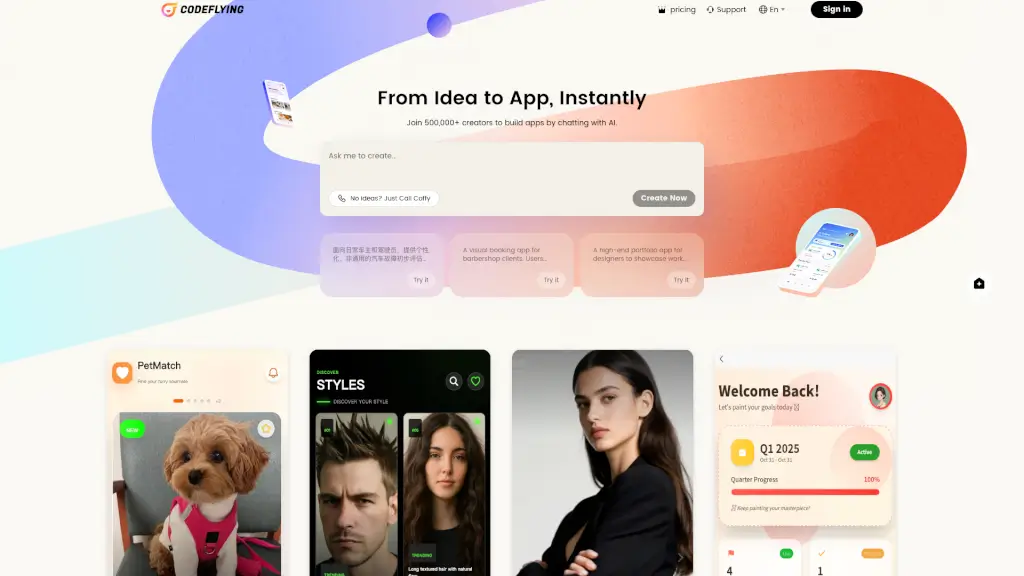
Tired of wrestling with complex code just to bring your app idea to life? Meet CodeFlying—the vibe coding app builder that lets you create full-stack applications simply by chatting with AI. Just describe what you want in plain English (or any of 12 supported languages), and CodeFlying generates a working, deployable app in minutes—not days or weeks.
Whether you're a student building your first project, a founder validating an idea, or a professional prototyping fast, CodeFlying removes the technical barriers. No more getting stuck on backend setup, database schemas, or frontend styling. The AI understands your vision and handles the heavy lifting, so you can go from "What if?" to "It works!" almost instantly.
What are the features of CodeFlying?
- Vibe Coding Interface: Build full-stack apps through natural conversation—no coding required.
- Multi-Language Support: Create and interact in English, Chinese, Spanish, Portuguese, German, French, Vietnamese, Korean, Japanese, Thai, Hindi, Arabic, Turkish, or Indonesian.
- Instant App Generation: Get a complete, functional web app within minutes of describing your idea.
- Pre-Built Templates: Jumpstart with examples like CarFault Diagnostic Advisor, StyleSnap & Book, or DesignFolio.
- AI-Powered Diagnostics: For specialized apps like car troubleshooting, the AI analyzes symptoms and delivers structured reports.
- History & Save Functionality: Automatically saves your app versions and diagnostic history for future reference.
- Test Mode: Experiment risk-free before going live or committing to paid plans.
What are the use cases of CodeFlying?
- A car owner describes unusual engine noises and gets a step-by-step diagnostic report with likely causes and next steps.
- A barber shop client browses hairstyle photos, books an appointment instantly, and receives a visual reference card for their stylist.
- A freelance designer showcases their portfolio with immersive galleries and smooth navigation—built without touching a line of code.
- A teacher creates a fun, drag-and-drop math learning app for students in under 10 minutes.
- A small business builds a tranquil task manager to organize daily operations and team workflows.
- An indie creator develops an interactive fairy tale or emoji-themed journal app for mobile users.
- A community organizer launches a “Neighborly Connect” app to share local updates and events.
How to use CodeFlying?
- Sign in to CodeFlying using your preferred language from the global menu.
- Describe your app idea clearly in the chat—include features, audience, and purpose (e.g., “I need a booking app for my salon”).
- Review the AI-generated preview and request tweaks via chat (“Make the colors warmer” or “Add a save button”).
- Use Test Mode to try your app before publishing or upgrading.
- Explore template examples like “CarFault Diagnostic Advisor” if you’re out of ideas—just click “Try it.”
- Once satisfied, deploy your app or download the code for further customization.