
What is Orchids?
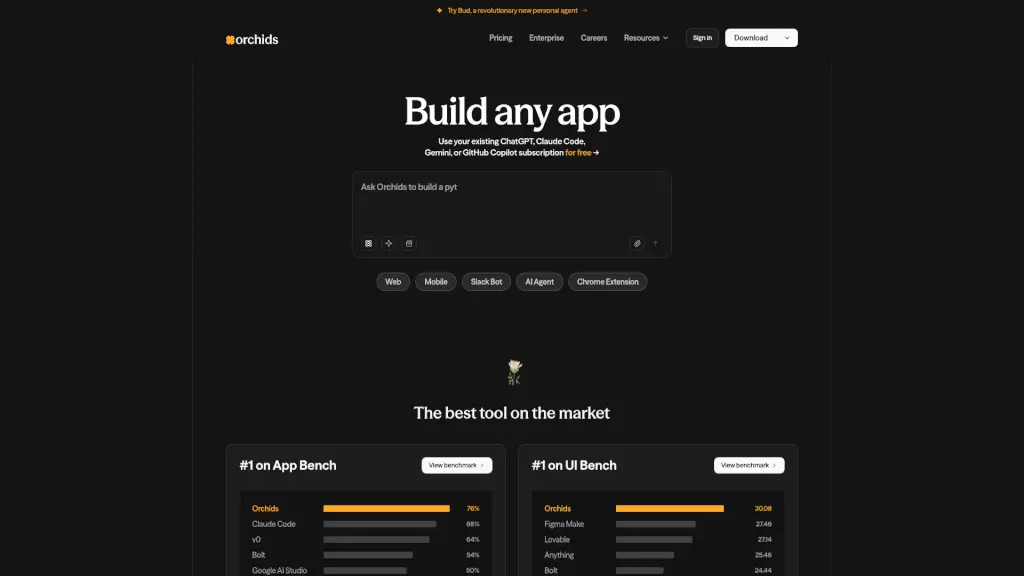
Orchids is an AI-powered IDE that lets you build full-stack apps just by chatting—no complex setup or deep coding knowledge required. Whether you're making a web app, mobile game, Slack bot, or Chrome extension, Orchids turns your ideas into working software through simple conversation.
What makes Orchids stand out is how it works with the tools you already use. You can plug in your existing ChatGPT, Claude Code, Gemini, or GitHub Copilot subscription—or even your own API key—and start building right away. It’s like having a coding partner who plans, debugs, runs commands, and handles integrations, all from one chat window.
What are the features of Orchids?
- AI-Powered Full-Stack Development: Build complete apps—from frontend to backend—using natural language prompts.
- Works With Your Existing AI Subscriptions: Use ChatGPT, Claude Code, Gemini, GitHub Copilot, or any custom API key at no extra cost.
- Supports Every Major Language & Framework: React, Next.js, Python, Swift, Flutter—you name it, Orchids supports it.
- Multi-Platform App Builder: Create web apps, mobile apps, CLI tools, AI agents, Slack bots, and Chrome extensions.
- Built-In Coding Agent: Orchids doesn’t just suggest code—it plans features, debugs errors, runs terminal commands, and manages dependencies.
- Top-Rated Performance: Ranked #1 on both App BenchView (76% score) and UI BenchView (30.08 score), outperforming competitors like v0, Bolt, and Replit.
What are the use cases of Orchids?
- A solo founder quickly prototypes a mobile app MVP without hiring developers.
- A marketer builds a custom Slack bot to automate team notifications using plain English.
- A student creates a Chrome extension for class projects by describing what it should do.
- A startup team develops a full-stack AI agent that integrates with their existing APIs.
- A designer turns Figma mockups into a working web app using voice or text prompts.
- A developer automates internal CLI tools by chatting with Orchids instead of writing boilerplate code.
How to use Orchids?
- Download Orchids for free on Mac, Windows, or Linux from the official website.
- Sign in and connect your preferred AI service (e.g., ChatGPT, Claude, or your own API key).
- Start a new project by describing your app idea in the chat—like “Build a to-do list web app with user login.”
- Let Orchids generate, run, and refine the code while you review or give feedback in real time.
- Export, deploy, or continue iterating—all within the same intuitive interface.
- Explore templates for Web, Mobile, Slack Bot, AI Agent, or Chrome Extension to jumpstart your build.