What is lofi.town?
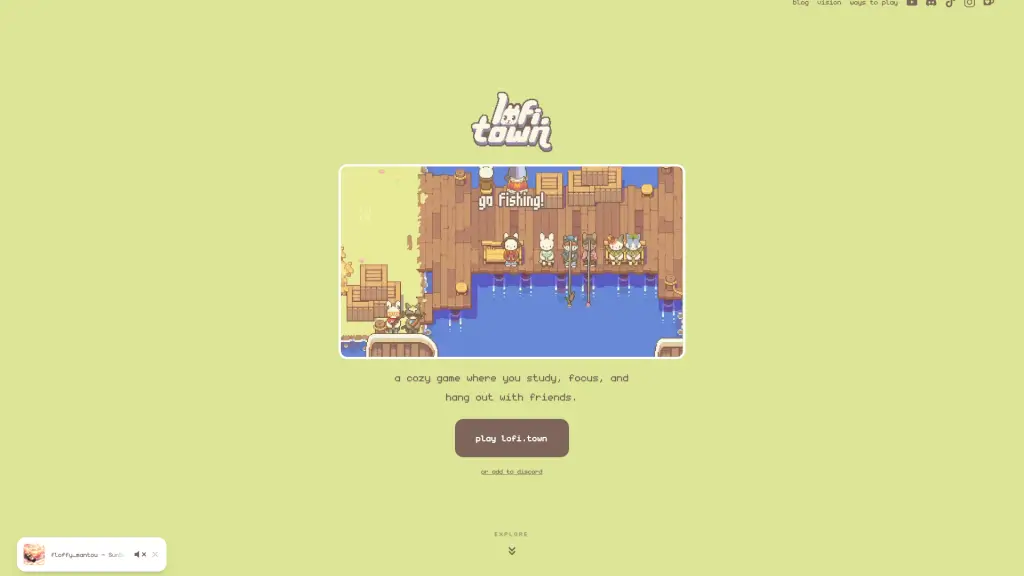
lofi.town is a free, browser-based lofi study app that blends productivity with cozy virtual world gameplay. Designed for students, remote workers, and anyone who struggles to focus alone, it uses the power of body doubling—working alongside others—to boost motivation and accountability. You’re not just ticking off tasks; you’re doing it in a warm, pixel-art town where your bunny avatar sips coffee, decorates a burrow, and fishes by the pier while you study.
More than just timers and to-do lists, lofi.town turns focus into a shared, social experience. Whether you're cramming for finals, writing a thesis, or tackling work emails, you can do it side-by-side with friends (or friendly strangers) in real time—all without downloading anything or paying a cent.
What are the features of lofi.town?
- Body Doubling in Real Time: Study alongside others in a shared virtual space—seeing peers stay focused helps you stay on track too.
- Built-in Pomodoro Timer: Work in focused 25-minute intervals with automatic breaks to maintain energy and avoid burnout.
- Minimalist Task Lists: Keep your next steps clear with a simple, distraction-free to-do list that syncs with your focus sessions.
- Curated Lo-Fi Radio: Stream hand-picked, high-quality lo-fi beats designed to enhance concentration without lyrical distractions.
- Customizable Bunny Avatar: Express yourself with unique colors, outfits, and accessories for your personal study companion.
- Personal Burrow Decoration: Design your own cozy study nook with furniture, plants, and collectibles to make focus feel inviting.
- Fishing & Exploration: Unwind between sessions by fishing at the pier or exploring themed zones like Lofee Cafe and Main Town.
- Cross-Platform Access: Works instantly in any modern browser—no downloads, no sign-up beyond Discord, fully mobile-friendly.
What are the use cases of lofi.town?
- A college student with ADHD uses lofi.town during exam season to stay accountable with visual cues and structured Pomodoro sessions.
- Remote teammates host virtual co-working hours in Main Town to mimic an office environment while staying productive.
- High schoolers studying for AP exams invite friends to join their burrow, turning solo homework into a group hangout.
- A med student decorates their burrow as a calming retreat and uses task lists to manage overwhelming coursework.
- Someone new to body doubling tries lofi.town as a gentle, low-pressure way to build focus habits with community support.
- Users take short breaks to fish or explore updates, making productivity feel less like a chore and more like self-care.
How to use lofi.town?
- Go to app.lofi.town in any browser (Chrome, Safari, Firefox, etc.).
- Log in using your Discord account—no password or credit card needed.
- Customize your bunny avatar and set up your first task list before starting a focus session.
- Invite friends via Discord or join public areas like Main Town to study alongside others in real time.
- Use the Pomodoro timer with your tasks: when the 25-minute focus block ends, your progress auto-saves.
- Explore different locations (Pier, Cafe, Burrow) to find your ideal focus vibe—each has unique ambient sounds and aesthetics.