
What is r1 by rabbit?
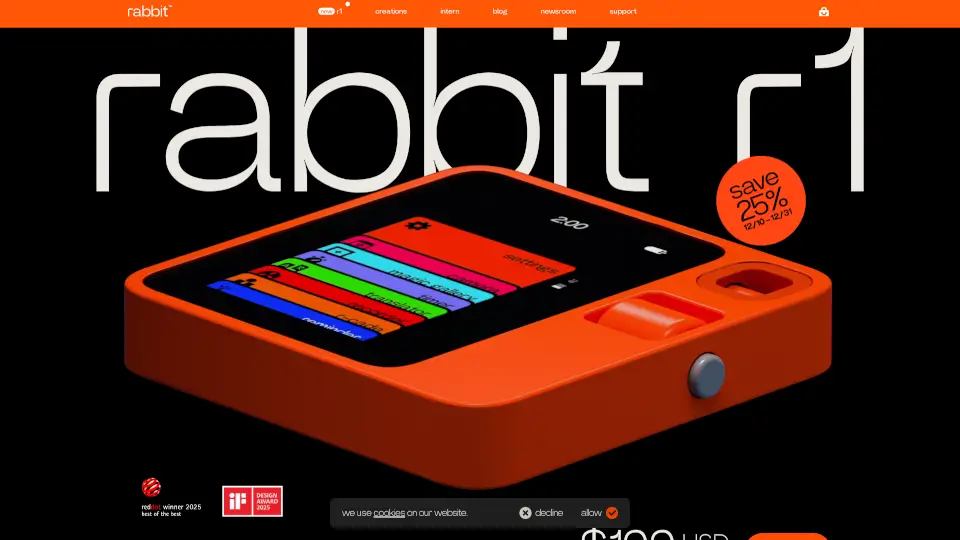
Meet the rabbit r1—a sleek, $199 AI-native device designed to put powerful artificial intelligence right in your pocket. Unlike smartphones that run dozens of apps, the r1 focuses on one thing: being your personal AI assistant for everyday tasks like answering questions, translating languages, recording voice notes, and summarizing conversations—all without a subscription.
Built with a retro-futuristic design by Teenage Engineering (in collaboration with rabbit’s founder Jesse), the r1 stands out with its intuitive interface and minimalist hardware. It runs rabbitOS 2.2, giving you access to cutting-edge features like Claude Code, an upgraded Magic Camera, and the new DLAM technology that lets you control your computer just by talking or typing. Whether you're a student, creator, or tech enthusiast, the r1 offers unlimited AI interactions at no extra cost.
What are the features of r1 by rabbit?
- Unlimited AI ConversationsGet instant answers, translations, and smart summaries—no paywalls or subscriptions.
- Magic RecorderCapture voice notes anytime, with free automatic transcripts and AI-powered summaries.
- DLAM TechnologyUse r1 as a plug-and-play controller for your computer—just plug it in and command tasks across apps and browsers.
- Claude Code & OpenClaw AccessTap into advanced coding and agent capabilities directly on-device.
- Magic CameraEnhanced visual recognition for real-time object and text interaction.
- Creations UITurn any idea—games, tools, experiences—into personalized “vibe-coded” creations.
- No Subscription RequiredAll core AI features work out of the box with no recurring fees.
- rabbitOS 2.2The latest OS update brings smoother performance, better agent integration, and refined user experience.
What are the use cases of r1 by rabbit?
- Translate menus or signs instantly while traveling abroad using voice or camera input.
- Record and summarize lectures or meetings with automatic transcripts and key-point highlights.
- Control your laptop hands-free—ask r1 to open files, draft emails, or navigate websites via DLAM.
- Build custom mini-apps or interactive games using the Creations gallery and vibe-coding tools.
- Get quick homework help or research facts using on-device AI without distractions from social media.
- Use Magic Camera to scan documents, identify plants, or extract text from images in real time.
How to use r1 by rabbit?
- Charge your r1 fully before first use—it ships ready to go in just 3 business days.
- Say “Hey rabbit” or press the talk button to start voice commands for questions, recordings, or actions.
- Plug r1 into your computer via USB to activate DLAM—then speak or type prompts to automate desktop tasks.
- Explore the Creations Gallery to discover or publish your own AI-powered tools and experiences.
- Set up third-party AI agents yourself if desired (note: rabbit doesn’t support or maintain these).
- Keep your device updated through rabbitOS to access new features like Claude Code and Magic Camera improvements.