什麼是Onison?
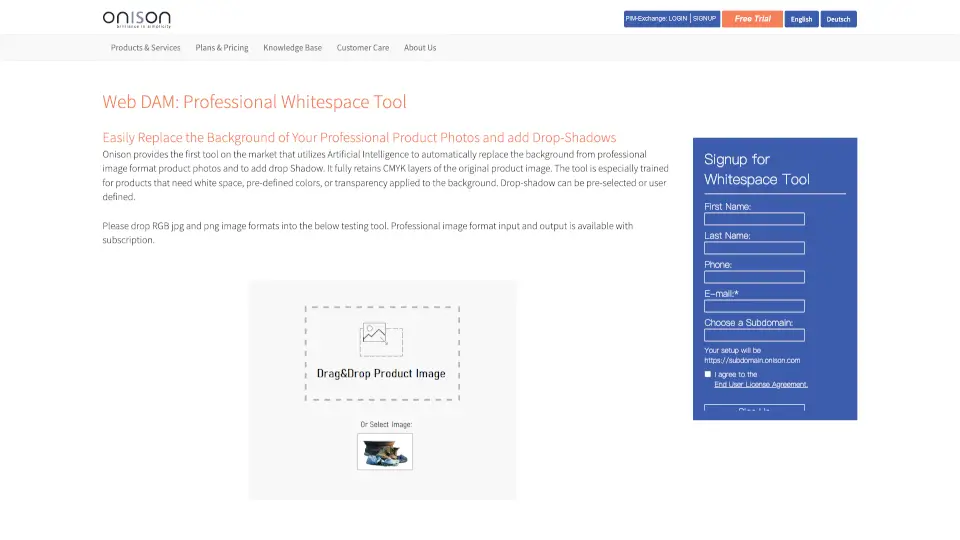
Onison 的專業留白工具(Whitespace Tool)是一款專為電商、攝影師與品牌團隊打造的智慧型圖片背景處理工具。它運用人工智慧技術,能自動移除產品照片的原始背景,並替換為純白、透明或自訂顏色,同時保留原始影像的 CMYK 色彩層級——這對印刷品質至關重要。無論你是製作商品目錄、官網主圖還是社交媒體素材,都能快速獲得專業級的乾淨背景圖。
這款工具特別針對需要「留白空間」的產品照片進行優化訓練,例如服飾、電子產品、美妝品等,還能一鍵添加自然的陰影效果,讓產品看起來更立體真實。無需 Photoshop 技巧,拖放即可完成高品質輸出,大幅節省後製時間與成本。
Onison的特色是什麼?
- AI 智慧去背:自動精準移除產品背景,保留細膩邊緣(如頭髮、透明材質)
- CMYK 完整支援:處理專業印刷格式時不損失色彩資訊,適合印刷用途
- 多樣背景選項:可選擇純白、透明或任意自訂顏色作為新背景
- 可調式陰影效果:內建預設陰影或自行定義角度、模糊度與透明度
- 廣泛格式相容:支援 JPG、PNG、TIFF、GIF、BMP、DNG(RAW)等 RGB 與 CMYK 格式
- 簡單定價方案:每月 $20 美元含 50 張處理,額外每 5 張僅 $1(約 20 美分)
Onison的使用案例有哪些?
- 電商賣家快速製作符合平台規範(如 Amazon、Shopee)的純白背景商品圖
- 品牌行銷團隊統一產品視覺風格,用於官網、DM 或社群貼文
- 攝影工作室自動化後製流程,減少手動修圖工時
- 印刷公司準備高品質 CMYK 圖檔,確保紙本目錄色彩準確
- 小型企業以低成本實現專業級產品影像,提升品牌形象
- 多頻道零售商同步產出適用於線上與線下的標準化圖片
如何使用Onison?
- 將 RGB 格式的 JPG 或 PNG 圖片拖入網頁測試工具即可立即預覽效果
- 訂閱後可上傳專業格式(如 CMYK TIFF、DNG RAW)進行完整處理
- 在設定中選擇背景類型(透明/白色/自訂色)與陰影樣式
- 下載處理完成的圖片,直接用於網站、印刷或廣告素材
- 利用 1GB 免費儲存空間管理所有資產,並可無限次下載分享
- 若需大量處理,建議查看批量方案(每張低至 3 美分)
Onison聯絡郵件:
u.s.care@onison.com(北美) / eucare@onison.com(歐洲)