
Что такое Liner.ai?
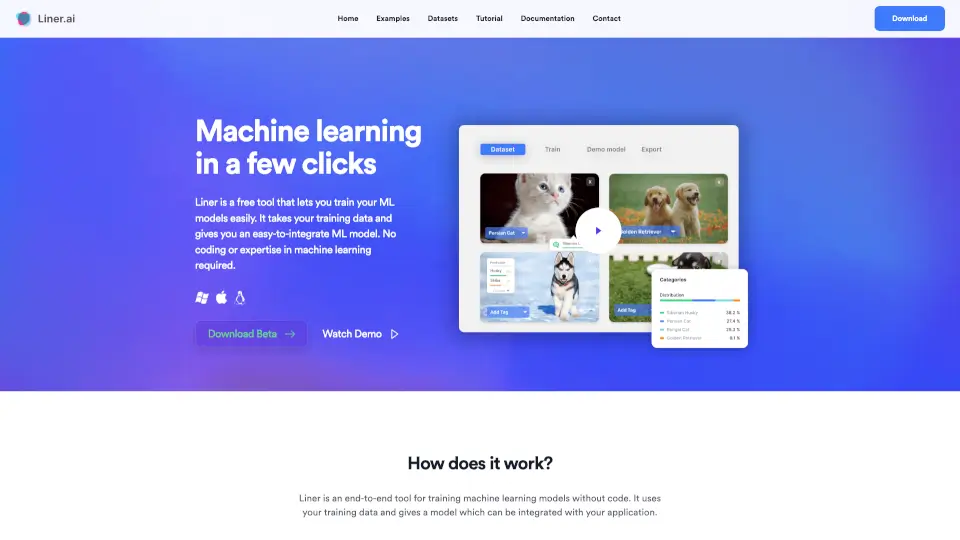
Liner.ai — это бесплатный и интуитивно понятный инструмент, который позволяет создавать и внедрять приложения машинного обучения за считанные минуты. В отличие от сложных облачных платформ, требующих глубоких технических знаний, Liner переносит весь процесс прямо на ваш компьютер. Вам не нужно писать ни строчки кода или разбираться в сложных алгоритмах, чтобы получить готовую нейросеть.
Настоящая магия этого инструмента кроется в его подходе к конфиденциальности и скорости. Поскольку обучение происходит локально, ваши данные никогда не покидают устройство, что делает его идеальным выбором для работы с чувствительной информацией. Кроме того, модели специально оптимизированы для работы на стандартных процессорах, поэтому вам не придется покупать дорогую видеокарту, чтобы начать свой путь в мир искусственного интеллекта.
Какие особенности у Liner.ai?
- Локальное обучение: Все вычисления происходят на вашем ПК, гарантируя полную приватность данных без отправки в облако.
- Работа без GPU: Алгоритмы оптимизированы для быстрого и эффективного обучения на обычных центральных процессорах.
- Готовые шаблоны задач: Поддержка классификации изображений, текста, аудио и видео, а также обнаружения объектов и сегментации.
- Простой экспорт: Легко выгружайте обученные модели для интеграции в мобильные приложения или edge-устройства.
- Управление проектами: Создавайте неограниченное количество проектов, работайте в команде и обменивайтесь файлами внутри интерфейса.
Какие случаи использования Liner.ai?
- Создание умного приложения для автоматической сортировки мусора по фотографиям (Image Classification).
- Разработка системы безопасности для распознавания конкретных объектов или людей на видеопотоке (Object Detection).
- Обучение модели для анализа тональности отзывов клиентов и автоматической рубрикации писем (Text Classification).
- Создание фитнес-трекера, который оценивает правильность выполнения физических упражнений по позе (Pose Classification).
- Разработка голосового помощника, способного различать специфические звуки или голосовые команды (Audio Classification).
Как использовать Liner.ai?
- Шаг 1: Импортируйте данные. Загрузите свои обучающие выборки в Liner или воспользуйтесь готовыми датасетами из встроенной библиотеки.
- Шаг 2: Выберите тип задачи. Определите цель вашей модели: классификация, обнаружение объектов, сегментация или распознавание поз.
- Шаг 3: Запустите обучение. Нажмите одну кнопку, и система автоматически подберет оптимальную архитектуру и обучит её на вашем ПК.
- Шаг 4: Экспортируйте результат. Скачайте готовую модель и легко интегрируйте её в ваше приложение для мобильных или периферийных устройств.