FocuSeeとは何ですか?
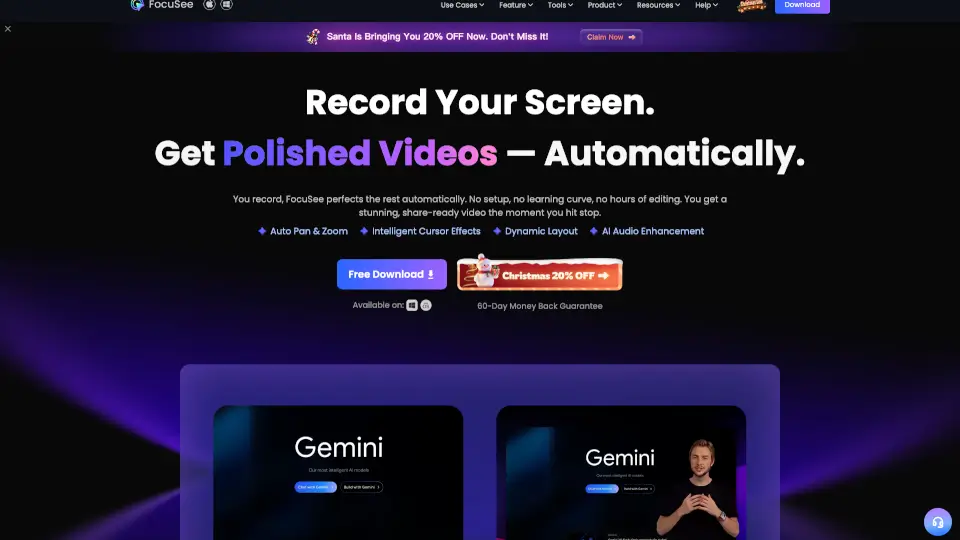
FocuSeeは、AIが自動で動画を仕上げてくれる次世代のスクリーンレコーダーです。あなたが録画を始めてストップボタンを押すだけで、クリックに合わせた自動ズーム、カーソル追跡、不要な無言部分のカット、音声の強化など、プロ級の編集が一瞬で完了します。面倒な編集ソフトの操作や長い待ち時間はもう必要ありません。WindowsとMacの両方に対応しており、製品デモ、チュートリアル、オンラインコース、マーケティング動画を短時間で作れます。
FocuSeeの特徴は何ですか?
- 自動ズーム & カーソル追跡: クリックやマウス操作をAIが認識し、自動でズームイン・アウト。カーソルに3Dモーション効果を追加して、注目ポイントを明確に伝えます。
- AI音声強化 & ノイズ除去: 呼吸音や口の雑音、背景ノイズを除去し、まるでスタジオ録音のようなクリアな音声に。フィラーワード(「えーと」「あのー」)や無言部分はワンクリックで自動カット。
- AI自動字幕生成: 50以上の言語に対応し、98%以上の精度で字幕を自動生成。英語、フランス語、スウェーデン語など、どんな言語でもOK。
- AIバーチャルアバター: カメラに映りたくない場合でも、AIが生成したデジタルアバターが代わりに話してくれます。プライバシーを守りながら、プロフェッショナルな印象を維持。
- AI背景除去: グリーンバック不要で、自宅の部屋をスタジオ品質の背景に変更・ぼかしが可能。
- 注釈 & ウォーターマーク: テキスト、矢印、スポットライトなどの注釈を画面上に重ねて説明をわかりやすく。ブランドのウォーターマークも簡単に追加できます。
- テレプロンプター機能: 録画中にスクリプトを画面に表示。原稿を覚えなくても、流暢で自信のあるプレゼンテーションが実現。
- モバイル端末録画: iOS/Android端末をUSBでPCに接続し、そのまま録画&自動編集。アプリのチュートリアル作成に便利。
FocuSeeの使用例は何ですか?
- 製品デモ動画: 新機能や操作方法を視覚的に強調。自動ズームとスポットライトで、エンジニアやデザイナーでなくても見やすいデモに。
- チュートリアル・ハウツー動画: ショートカットキー表示、カーソル効果、動的カメラレイアウトで、視聴者が迷わない解説動画をあっという間に作成。
- オンラインコース・教育動画: テレプロンプターで講義をスムーズに進行。AI字幕と音声強化で、学習者の理解度が向上。
- マーケティング・プロモーション動画: ブランド感を統一するカスタムテンプレート、ウォーターマーク、背景除去機能で、プロ並みのプロモーション動画を自社内で完結。
- リアクション動画・プレゼン動画: 自分の顔と画面を同時に録画し、PIP(ピクチャーインピクチャー)やフルスクリーンレイアウトを自在に切り替え。
- SNS向けショート動画: ワンクリックでTikTok、Instagram、YouTubeなど各プラットフォームのアスペクト比に自動調整。縦横切り替えも一瞬。
FocuSeeの使い方は?
- FocuSeeを起動し、録画範囲(フルスクリーン・特定ウィンドウ・カスタム範囲)を選択します。
- 必要に応じてウェブカメラやマイク、システム音声の録音設定を行います。テレプロンプターを使う場合はスクリプトを入力。
- 録画ボタンを押して録画を開始。操作を進めると、FocuSeeがクリックやマウス移動を自動追跡します。
- 録画停止後、自動編集が適用されます。必要に応じて字幕の確認、カットの調整、エフェクトの追加を編集画面で数クリックで行えます。
- 書き出し時に、YouTubeやInstagramなどターゲットプラットフォームのプリセットを選ぶか、4K 60fpsの高品質動画やGIFを選択。オンライン共有リンクの作成も可能。