
What is Ddict?
Ddict is your go-to AI-powered translation and writing assistant that makes language barriers a thing of the past. Whether you're reading, writing, or just trying to understand a foreign text, Ddict has got you covered. It’s simple, fast, and works right in your browser.
What are the features of Ddict?
- Instant Translation: Translate any text directly within your browser with just a click or keypress.
- Multi-Language Support: Works with over 20 languages, including English, Spanish, Chinese, and more.
- AI-Powered Summaries: Get concise summaries of lengthy content to save time and improve understanding.
- Writing Assistance: Improve your writing with grammar and spelling checks, ensuring your messages are always polished.
- Text-to-Speech: Listen to the pronunciation of words or sentences to enhance your learning experience.
What are the use cases of Ddict?
- Students: Translate and understand foreign texts for assignments or research.
- Professionals: Communicate clearly in emails or documents with accurate translations and writing tips.
- Travelers: Quickly translate signs, menus, or conversations while abroad.
- Language Learners: Practice pronunciation and expand vocabulary with ease.
How to use Ddict?
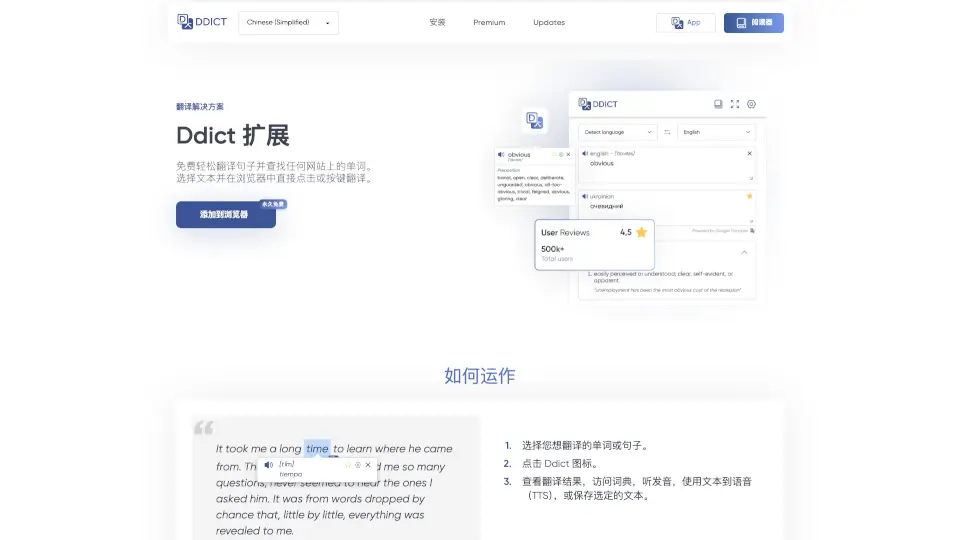
- Select Text: Highlight the word or sentence you want to translate.
- Click Ddict Icon: Open the Ddict extension in your browser.
- View Results: Get translations, access the dictionary, listen to pronunciations, or save the text for later.