
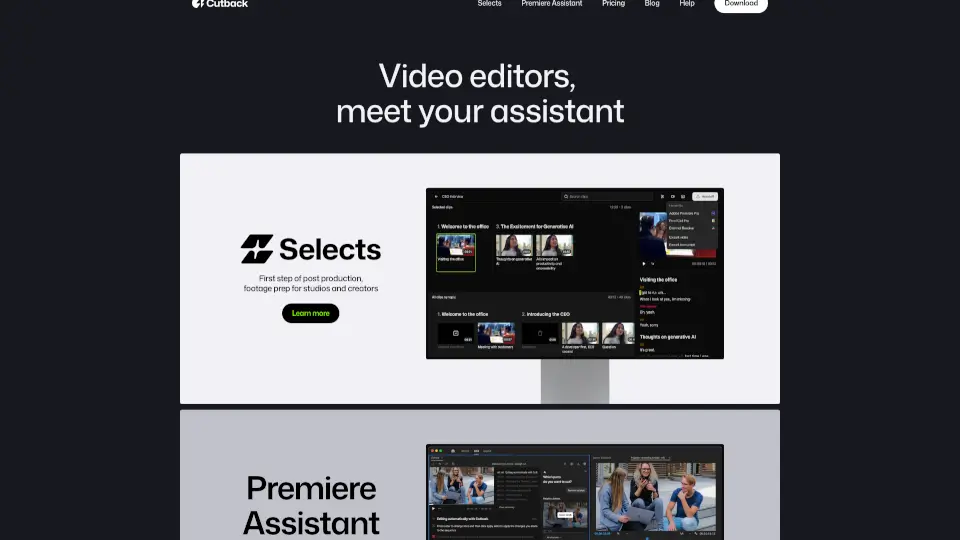
¿Qué es Selects?
Cutback - Tu Asistente de Edición de Vídeo es la solución perfecta para videógrafos, creadores y estudios que buscan aumentar su productividad. Con herramientas como Selects y Premiere Assistant, Cutback te ayuda a preparar tu material, transcribir, traducir, eliminar silencios, añadir animaciones y mucho más. Todo esto con flujos de trabajo automatizados que pueden aumentar tu productividad hasta en un 300%.
¿Cuáles son las características de Selects?
- Automatización de Edición: Edita automáticamente tu material bruto y multicámara.
- Transcripción y Traducción: Convierte el audio en texto y traduce tus videos a diferentes idiomas.
- Eliminación de Silencios: Remueve los espacios en blanco y los momentos innecesarios del video.
- Animaciones: Añade efectos visuales a tus proyectos.
- Integración con Adobe Premiere Pro: Trabaja directamente desde Premiere Pro con Premiere Assistant.
¿Cuáles son los casos de uso de Selects?
- Para Estudios de Producción: Prepara y edita rápidamente grandes cantidades de material.
- Para Creadores Individuales: Ahorra tiempo en la edición y enfoquese en la creatividad.
- Para Freelancers: Termina proyectos antes de lo previsto y mejora la calidad de tu trabajo.
¿Cómo usar Selects?
- Inicia Sesión: Regístrate en Cutback y comienza a usar las herramientas.
- Sube tu Material: Importa tu material bruto a la plataforma.
- Usa Selects: Permite a Cutback generar un corte inicial automático.
- Añade Efectos y Animaciones: Personaliza tu video con las herramientas de edición.
- Exporta tu Proyecto: Finaliza tu edición y exporta el video en el formato deseado.