
What is agent-browser?
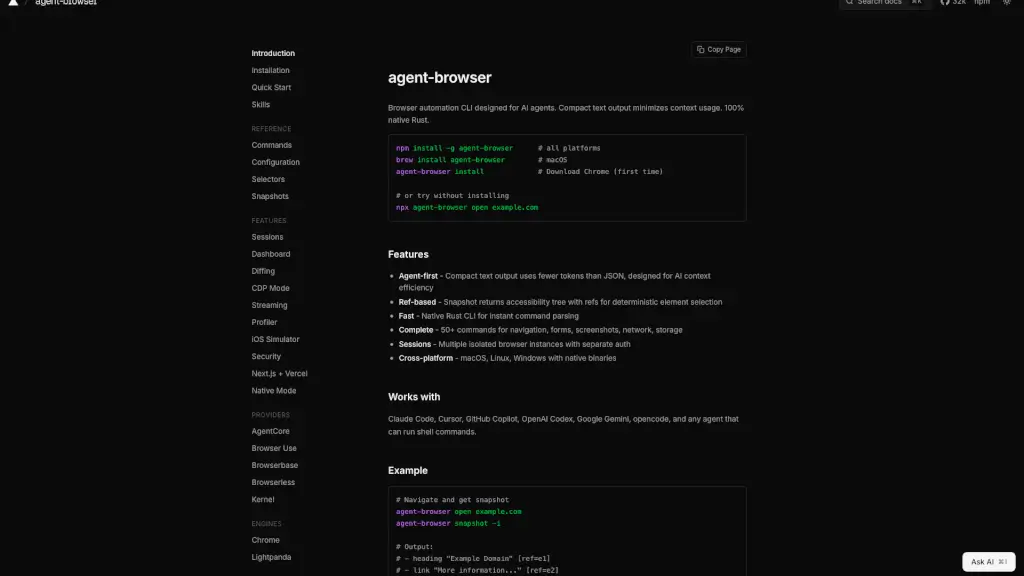
agent-browser is a lightning-fast browser automation tool built specifically for AI agents. Unlike traditional tools that dump huge JSON responses, it delivers compact, human-readable text output—so your AI spends fewer tokens understanding the page and more on taking smart actions. Whether you're building an autonomous agent or just need reliable browser control from the command line, agent-browser gives you precision without the bloat.
Powered entirely by native Rust, it’s designed for speed, efficiency, and seamless integration with popular AI coding assistants like GitHub Copilot, Claude Code, and Google Gemini. With its unique ref-based element selection system, you can navigate, click, fill forms, and take screenshots using simple, deterministic references—no fragile CSS selectors needed.
What are the features of agent-browser?
- AI-Optimized Output: Returns minimal, readable text snapshots (~200–400 tokens) instead of massive DOM trees, saving precious AI context
- Ref-Based Interaction: Every element gets a unique ref (like @e1), enabling fast, deterministic clicks and inputs without re-querying the page
- Native Rust Performance: Blazing-fast CLI and daemon architecture with zero JavaScript overhead
- Full Browser Control: Over 50 commands for navigation, screenshots, network monitoring, storage, and more
- Session Isolation: Run multiple independent browser sessions—perfect for testing different logins or workflows
- Cross-Platform Support: Works natively on macOS (ARM64/x64), Linux, and Windows
- Automatic Daemon Management: The background daemon starts on demand and stays alive between commands for instant responsiveness
What are the use cases of agent-browser?
- Automate web tasks inside AI-powered coding agents like Cursor or OpenCode
- Build lightweight browser bots that interact with real websites using natural language prompts
- Capture clean accessibility-based snapshots for AI analysis without HTML noise
- Test user flows across isolated sessions (e.g., logged-in vs. guest views)
- Take automated screenshots during agent-driven workflows
- Debug or monitor network activity during browser automation
- Integrate browser actions into shell scripts controlled by LLMs
How to use agent-browser?
- Install globally with
npm install -g agent-browseror via Homebrew on macOS (brew install agent-browser) - Run
agent-browser installonce to download the bundled Chrome instance - Open a site:
agent-browser open example.com - Get a compact snapshot with refs:
agent-browser snapshot -i - Interact using refs:
agent-browser click @e2 - Save results with
agent-browser screenshot page.pngand clean up withagent-browser close