
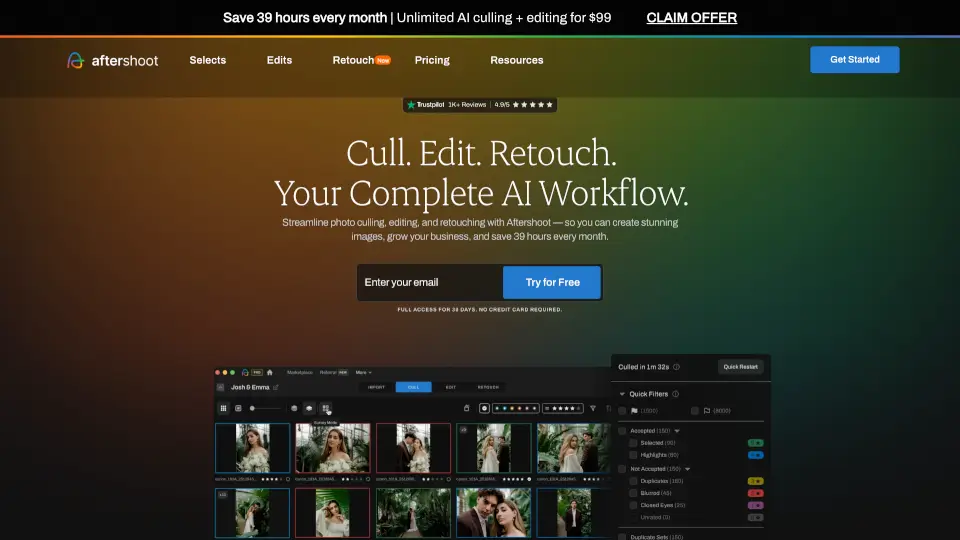
Was ist AfterShoot?
Aftershoot ist eine intelligente KI-basierte Software für Fotograf:innen, die das mühsame Nachbearbeiten von Fotos automatisiert – ohne den eigenen Stil zu verlieren. Ob Hochzeits-, Familien- oder Eventfotografie: Mit Aftershoot sparst du bis zu 39 Stunden pro Monat, weil KI dir beim Auswählen (Culling), Bearbeiten und Retuschieren hilft.
Die Besonderheit? Aftershoot lernt deinen individuellen Look und wendet ihn konsistent auf ganze Shoots an – lokal auf deinem Rechner, ohne Internetverbindung und mit vollem Datenschutz. So behältst du die kreative Kontrolle, gibst aber die Routinearbeit ab.
Was sind die Merkmale von AfterShoot?
- KI-gestütztes Culling: Tausende Bilder in Minuten vorselektieren – mit intelligentem Duplikat-Management und Entscheidungshilfen wie Survey Mode oder Spray Can.
- Stilbasiertes Editing: Importiere deine Lightroom-Presets oder trainiere die KI mit deinen bearbeiteten Fotos – sie lernt deinen Look und wendet ihn automatisch an.
- Natürliche Batch-Retusche: Haut, Haare, Brillenreflexe oder Hintergründe in ganzen Alben mit einem Klick verbessern – jedes Bild wird einzeln angepasst.
- Offline-Nutzung & Datenschutz: Alle Dateien bleiben auf deinem Computer; keine Cloud-Uploads nötig – ideal auch für Aufträge unter NDA.
- Kunden-Galerien inklusive: Erstelle direkt in Aftershoot professionelle Online-Galerien mit Gesichtserkennung, Favoritenfunktion und integriertem Shop für Prints.
- Flatrate-Preis ohne Bildlimit: Keine versteckten Kosten – du zahlst einen monatlichen Festpreis, egal wie viele Bilder du bearbeitest.
Was sind die Anwendungsfälle von AfterShoot?
- Hochzeitsfotograf:innen mit 2.000+ Bildern pro Tag sparen Tage an Culling- und Edit-Zeit.
- Familienfotograf:innen liefern konsistent bearbeitete Alben in ihrem Markenstil – schneller und stressfreier.
- Schulfotograf:innen nutzen Batch-Retusche, um Hunderte Porträts effizient zu bereinigen.
- Boudoir- oder Newborn-Fotograf:innen profitieren von diskreter Offline-Bearbeitung ohne Datenupload.
- Freiberufler:innen mit vollem Kalender gewinnen Zeit zurück für kreative Arbeit oder echte Pausen – wie echte Winterferien!
- Fotostudios steigern Kundenzufriedenheit durch schnelle Lieferung und professionelle Galerie-Erlebnisse.
Wie benutzt man AfterShoot?
- Lade Aftershoot für Windows oder macOS herunter – keine Kreditkarte nötig für die 30-Tage-Testversion.
- Importiere deine RAW-, JPEG- oder TIFF-Bilder direkt in die App (läuft komplett offline).
- Wähle zwischen KI-unterstütztem oder vollautomatischem Culling – bleib so viel im Fahrersitz, wie du möchtest.
- Trainiere deinen persönlichen AI Style, indem du 10–20 bereits bearbeitete Fotos hochlädst.
- Wende Retusche per Preset an und passe bei Bedarf manuell im integrierten RAW-Editor nach.
- Teile die fertige Galerie direkt aus Aftershoot mit deinen Kund:innen – inklusive Download und Print-Shop.