
What is Veo Sports Camera?
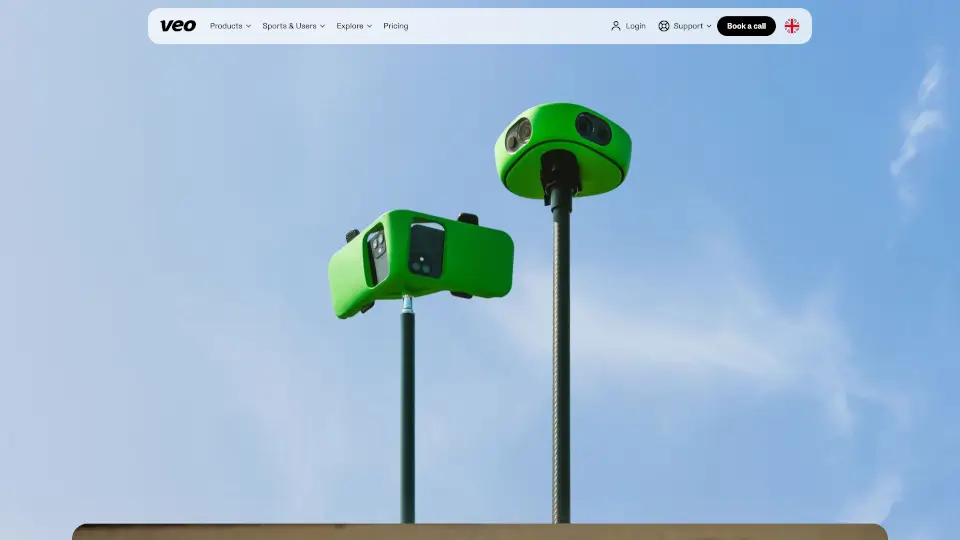
Veo is an AI-powered sports recording and analysis platform for coaches, players, and teams. It combines hardware (Veo Cam 3) or iPhone-based recording (Veo Go) with cloud software that automatically tags key moments, generates highlights, and enables livestreaming. Designed for football, rugby, basketball, lacrosse, and other team sports, Veo handles the full workflow from capture to post-match analysis without requiring manual editing or camera operation.
What are the features of Veo Sports Camera?
- AI Auto-Tagging: After recording, Veo automatically identifies and tags key moments like goals, touchdowns, or scrums, making footage searchable without manual review.
- Veo Cam 3 Hardware: A dedicated sports camera with built-in AI that records broadcast-quality video, follows the action, and supports livestreaming via Wi-Fi, ethernet, or 5G.
- Veo Go iPhone Recording: Turn two iPhones into a smart recording kit. Veo’s software handles stitching and uploads automatically, no extra hardware required.
- Veo Editor: Access all recorded matches in a cloud editor. Coaches and players can watch highlights, tag players, create clips, and share feedback immediately after the match.
- Veo Live Add-On: Livestream matches to any platform in real time. Add team logos, sponsored overlays, and broadcast to fans, families, and scouts.
- Veo Player Spotlight: Individually track each player’s movements and automatically generate personal highlight reels for recruiting or development.
What are the use cases of Veo Sports Camera?
- Coaches analyzing match footage to review tactics, formations, and player positioning after every game.
- Players building a recruiting profile by compiling their best moments from automatically generated highlight reels.
- Clubs livestreaming home matches to engage remote fans, parents, and sponsors with branded broadcasts.
- Parents recording youth games using only their iPhones and Veo Go, without needing to operate a camera.
- League administrators sharing match recordings across teams using the League Exchange add-on.
How to use Veo Sports Camera?
- Choose your recording method: set up a Veo Cam 3 on a tripod or install the Veo Go app on two iPhones.
- Position the camera(s) to cover the full field or court before the match starts.
- Start recording; the camera follows the action automatically, or the iPhones sync and upload to the cloud.
- After the match, open the Veo Editor to view auto-tagged moments, create highlights, and tag players.
- Enable add-ons like Veo Live or Veo Player Spotlight from your account settings to unlock additional features.