
Deepshot AI logo

Deepshot AI

37
3.0
(0 Reviews)
India58.52%

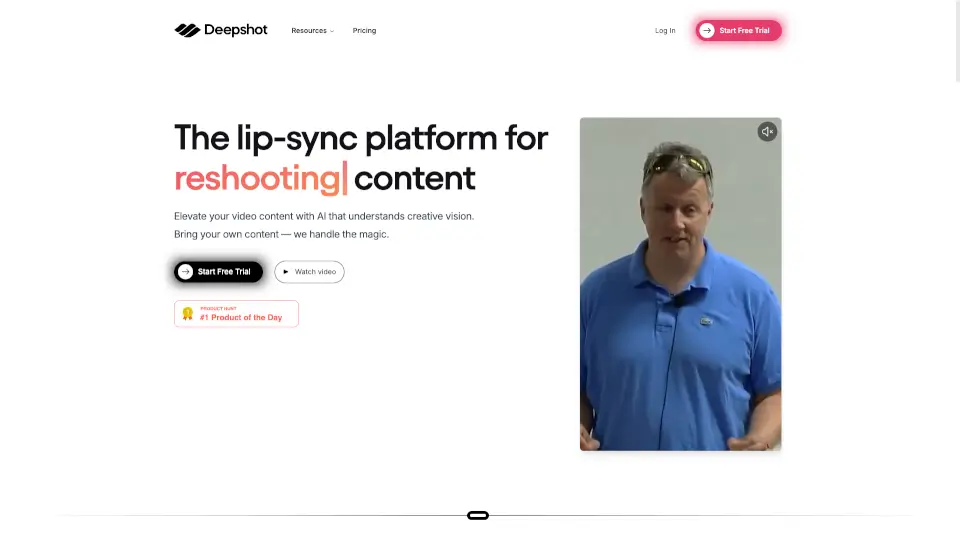
Deepshot.ai uses AI to turn screenshots into smart, explainable, and shareable insights—making visual information instantly understandable.

Added on: 2025.03.14 · Updated on: 2026.06.03
Social Media:
Deepshot AI

Deepshot AI Product Information

What is Deepshot AI?

Deepshot.ai is an AI-powered screenshot tool that transforms how you capture, understand, and share visual information from your screen. Instead of just saving static images, Deepshot uses artificial intelligence to analyze what’s in your screenshot—whether it's code, a webpage, a chart, or even handwritten notes—and instantly generates clear explanations, summaries, or actionable insights.

Whether you're a student trying to grasp complex concepts, a developer debugging code, or a professional sharing feedback with teammates, Deepshot saves time by turning screenshots into smart, searchable, and shareable content. It bridges the gap between seeing something on your screen and actually understanding or acting on it—no more guessing what a graph means or struggling to explain a UI bug.

What are the features of Deepshot AI?

  • AI-Powered Screenshot Analysis: Automatically interprets text, code, diagrams, and UI elements in your screenshots using advanced vision models.
  • Instant Explanations & Summaries: Get plain-English breakdowns of technical content, like code snippets or data visualizations, in seconds.
  • One-Click Sharing: Generate shareable links with embedded AI insights so others can understand your screenshot without back-and-forth messages.
  • Cross-Platform Support: Works seamlessly on macOS and Windows with a lightweight desktop app.
  • Privacy-First Processing: Screenshots are processed securely, and users can choose whether to store them or keep everything local.
  • Smart Search & History: Easily find past screenshots by content (e.g., “Python error” or “Q3 sales chart”) instead of filenames or dates.

What are the use cases of Deepshot AI?

  • A developer captures a confusing error message and gets an instant fix suggestion from Deepshot’s AI.
  • A student takes a screenshot of a dense textbook diagram and receives a simple explanation to aid studying.
  • A product manager shares a UI bug with their team via a link that includes AI-generated context about the issue.
  • A researcher captures a complex data chart and uses Deepshot to summarize key takeaways for a presentation.
  • A customer support agent quickly explains a user’s screenshot to engineering without manual annotation.
  • A teacher creates study guides by capturing lecture slides and auto-generating review notes.

How to use Deepshot AI?

  • Download and install the Deepshot desktop app from https://www.deepshot.ai
  • Press your custom hotkey (default: Cmd+Shift+5 on Mac or Ctrl+Shift+5 on Windows) to capture any screen area
  • Wait 2–3 seconds while Deepshot’s AI analyzes your screenshot
  • View the AI-generated summary or explanation in the pop-up window
  • Click “Share” to generate a link with embedded insights for teammates or classmates
  • Access your screenshot history anytime through the app to search or revisit past captures

Deepshot AI Contact Email:

[email protected]

Do you like this tool?

Upvote to help others discover it!

Deepshot AI Alternatives

LipDub AI

Transform your videos with LipDub AI's realistic AI lip sync technology. Create, translate, and personalize high-quality video content in minutes.

US
11.64%
|
45.9K
|
4.0
Sync Labs

Sync. is a revolutionary AI video lipsync tool that helps creators bring their videos to life with real-time lipsync, seamless translation, and powerful editing features.

PH
12.08%
|
352.5K
|
5.0
LipSync Studio

LipSync Studio is the #1 free AI lip sync tool for creating viral videos, dubbing, and multilingual content with studio-quality results in minutes.

US
15.14%
|
114.5K
|
5.0
LipSync.video

LipSync is the easiest way to create pro-level lip-synced videos for free. No skills, no fees, no fuss—just upload, sync, and share!

US
14.42%
|
637.1K
|
5.0
Translate.video

Translate.Video uses AI to instantly dub, subtitle, and translate videos into 75+ languages with studio-quality results—all in one app.

IN
28.05%
|
47.9K
|
4.0
Dubpro.ai

Dubpro.ai is the easiest way to dub videos with AI, offering high-quality, multilingual dubbing for creators and businesses. Try it today!

SG
55.92%
|
13.8K
|
4.0
BlipCut AI Video Translator

BlipCut AI Video Translator is a powerful tool for translating videos into 130+ languages with AI lip sync, voice cloning, and auto subtitles. Perfect for creators, businesses, and educators to reach global audiences effortlessly. ---

US
18.43%
|
145.0K
|
5.0
Pipio

Pipio’s Video Dubbing tool makes your videos globally accessible with AI-powered lip sync and voice cloning in over 40 languages.

US
89.03%
|
20.5K
|
4.0
Deepshot AI Related Other Categories

Deepshot AI Traffic Analysis

💡 Insights

🔍
Niche Tool
Lower traffic volume. Likely new or highly specialized. Good for early adopters.
➡️
Stable
Traffic remains stable, indicating a mature product.
👍
Good Experience
Bounce rate of 52%. Users are willing to explore features.
🌍
India Dominant
59% users from India. Optimized for this market.
  • Monthly Visits

    3.10K

  • Bounce Rate

    52.35%

  • Pages Per Visit

    1.69

  • Visit Duration

    00:00:32

  • Global Rank

    5322442

  • Country Rank

    2785934

Visits Over Time

Traffic Sources

GenAi0.00%
DisplayAds0.00%
SocialOrganic0.00%
Mail0.00%
SearchPaid0.00%
SocialPaid0.00%
Referrals0.00%
Affiliate0.00%
SearchOrganic0.00%
Direct0.00%

Top Keywords

1
deepshot labs, inc.
120Traffic
2
deepsoch ai website
50Traffic
3
deepsoch ai
CPC$0.57
20Traffic
4
deephot
0Traffic
5
deepsoch
0Traffic

Top Regions

RegionPercentage
India
India
58.52%
United States
United States
41.48%
Low
High

Deepshot AI FAQ

What makes Deepshot different from regular screenshot tools?

Is my data private when I use Deepshot?

Do I need to create an account to use Deepshot?

Which operating systems does Deepshot support?

Can Deepshot read handwritten notes or blurry screenshots?

How fast is the AI analysis?

Deepshot AI Reviews

0

0

0 Reviews
Sign Into leave a review

Recent Reviews

No reviews yet

Deepshot AI Embed

Use website badges to drive community support for SeekTool.ai. They are easy to embed in your homepage or footer.

Light
Dark
Deepshot AI - Featured on SeekTool.aiDeepshot AI - Featured on SeekTool.ai
How to install?

Looking for Deepshot AI Alternatives?

Compare top AI tools similar to Deepshot AI. Find the best option for your needs.

View Alternatives

Reviews

0.0

Share your experience with this tool...

Trending

Featured

Subscribe to our AI Newsletter

Get the top AI stories delivered to your inbox weekly.