
What is Video to Blog?
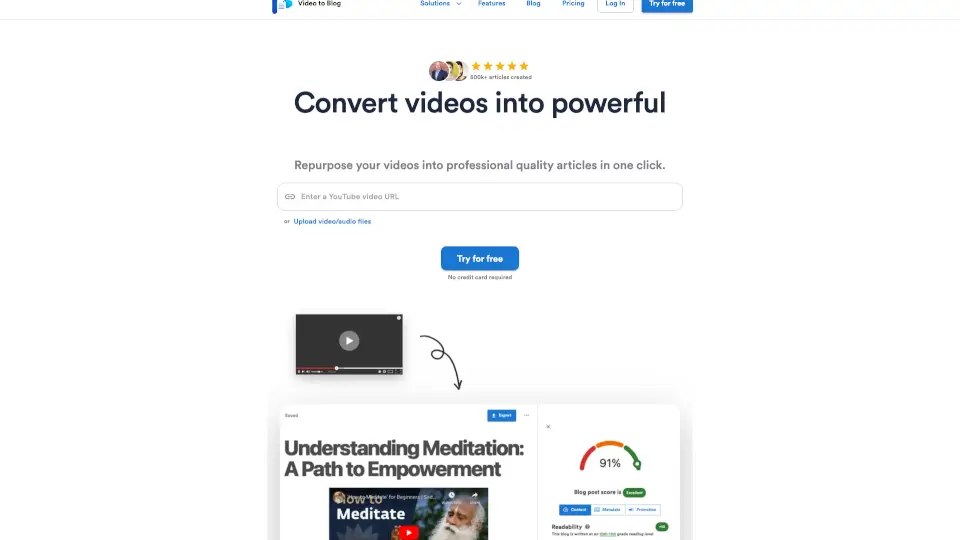
Tired of your great videos getting watched just once and then forgotten? Video To Blog gives your content a second life by instantly turning YouTube videos, podcasts, webinars, and more into polished, professional blog articles. No more wasting hours transcribing, editing, or formatting—just paste a link or upload a file, and get a ready-to-publish post in seconds.
Whether you’re a YouTuber, podcaster, realtor, church leader, or agency, this tool helps you repurpose video content effortlessly into SEO-friendly articles that drive traffic, grow your email list, and build authority—all while sounding like you, not robotic AI.
What are the features of Video to Blog?
- Professional Quality Writing: Creates natural-sounding, human-like articles that avoid generic "AI slop" and match your unique voice.
- Auto Screenshots: Pulls clean, relevant screenshots from your video with one click to make posts visually engaging.
- Smart Links: Automatically adds useful internal and external links so readers can explore further.
- Automations: Connect your YouTube channel to auto-generate blog posts every time you upload a new video.
- SEO Optimization: Structures content with proper headings, metadata, and readability for better search and AI discovery.
- Built-in Publications: Launch a website and email newsletter directly inside Video To Blog—no extra tools needed.
- One-Click Publishing: Export or publish to WordPress, email platforms, or download as HTML, Markdown, PDF, or Word.
What are the use cases of Video to Blog?
- Turn YouTube tutorials into step-by-step blog guides your audience can reference anytime.
- Convert podcast episodes into shareable articles to reach non-audio listeners and boost SEO.
- Repurpose sermons or lectures into devotional or educational content for your community.
- Transform real estate walkthrough videos into detailed property blog posts with embedded CTAs.
- Automate blog creation for agencies managing multiple client YouTube channels.
- Create email newsletters from webinar recordings to nurture leads after the live event.
- Turn product reviews into scannable comparison posts that drive affiliate clicks.
How to use Video to Blog?
- Paste a YouTube URL or upload a video/audio file to start conversion.
- Select your preferred tone, CTA blocks, and publishing destination (website, email, or download).
- Let Video To Blog auto-generate the article with screenshots, smart links, and SEO structure.
- Review and tweak if needed—then publish with one click or schedule for later.
- Connect your YouTube channel to enable automated blog creation for future uploads.
- Use the built-in publication builder to launch a blog or newsletter without coding.