¿Qué es 橙篇?
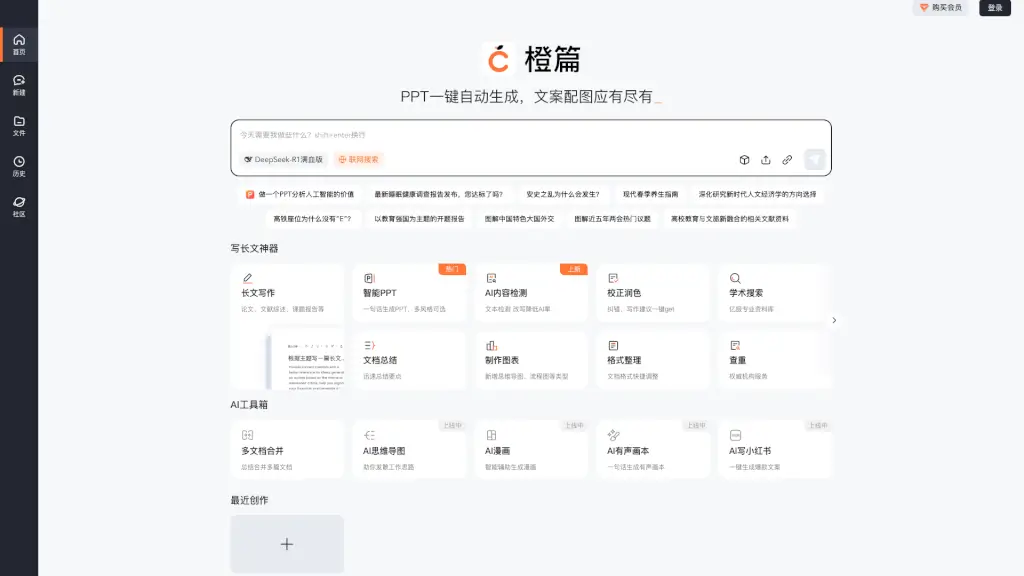
¿Necesitas crear presentaciones, informes o resúmenes de forma rápida y profesional? OrangeAI (también conocido como Chengpian AI) es tu asistente inteligente ideal. Diseñado para estudiantes, profesionales y creadores de contenido, este potente editor de IA te permite transformar archivos, enlaces o imágenes en documentos bien estructurados con solo unos clics.
Con funciones como generación automática de PPT, corrección de estilo, creación de mapas mentales y búsqueda académica, OrangeAI combina productividad, precisión y creatividad en una sola plataforma. Ya sea que estés preparando un análisis sobre la baja natalidad, un informe sobre consumo sostenible o una guía de primavera, esta herramienta te ahorra horas de trabajo manual.
¿Cuáles son las características de 橙篇?
- Generación Inteligente de PPT: Crea presentaciones completas a partir de una sola frase, con múltiples estilos visuales.
- Resumen Automático de Documentos: Extrae los puntos clave de textos largos, artículos o PDFs en segundos.
- Búsqueda Académica Avanzada: Accede a una base de datos con miles de millones de recursos académicos confiables.
- Corrección y Estilo Profesional: Revisa errores gramaticales y mejora el tono del texto con sugerencias útiles.
- Detección de Contenido de IA: Analiza si un texto parece generado por inteligencia artificial y ayuda a reducir su "huella".
- Creación de Gráficos y Mapas Mentales: Visualiza ideas complejas con diagramas, flujogramas y esquemas interactivos.
- Traducción Bilingüe Precisa: Traduce entre chino e inglés manteniendo el contexto y el estilo original.
- Generación de Referencias Bibliográficas: Crea citas y bibliografías en formatos académicos estándar al instante.
¿Cuáles son los casos de uso de 橙篇?
- Un estudiante universitario prepara una presentación sobre las causas de la Guerra de An Lushan usando fuentes históricas verificadas.
- Un investigador redacta una propuesta de tesis sobre la modernización china con apoyo de búsqueda académica y formato automático.
- Un creador de contenido genera guiones para redes sociales (como Xiaohongshu) optimizados para engagement.
- Un equipo de marketing analiza tendencias del mercado de consumo en 2025 y resume hallazgos en un informe ejecutivo.
- Un docente diseña material educativo combinando turismo cultural y educación superior mediante mapas conceptuales.
- Una persona común consulta una guía actualizada de cuidados de salud en primavera basada en medicina tradicional china.
¿Cómo usar 橙篇?
- Inicia sesión en la plataforma web de OrangeAI desde cualquier navegador.
- Haz clic en “Nuevo” y selecciona el tipo de documento que necesitas (PPT, informe, resumen, etc.).
- Pega tu texto, sube un archivo (PDF, Word, imagen) o introduce una URL para que la IA lo analice.
- Elige el estilo, formato o nivel de profundidad deseado (por ejemplo, “académico”, “informal” o “ejecutivo”).
- Usa las herramientas integradas como “Revisar”, “Traducir” o “Generar referencias” para pulir tu contenido.
- Descarga o comparte directamente tu documento final en múltiples formatos.